
Audio Quality and Live Captioning Accuracy: Why Your Microphone Setup Is the Most Important Captioning Decision You’ll Make
Every live captioning provider will tell you the same thing: the number one factor determining caption accuracy is not the software, not the AI model, and not the language pair. It is the audio signal feeding into the transcription engine. When event producers invest in real-time captioning and multilingual translation, they often focus on the output — the captions on screen, the translated text reaching attendees — while overlooking the input that makes or breaks the entire chain.
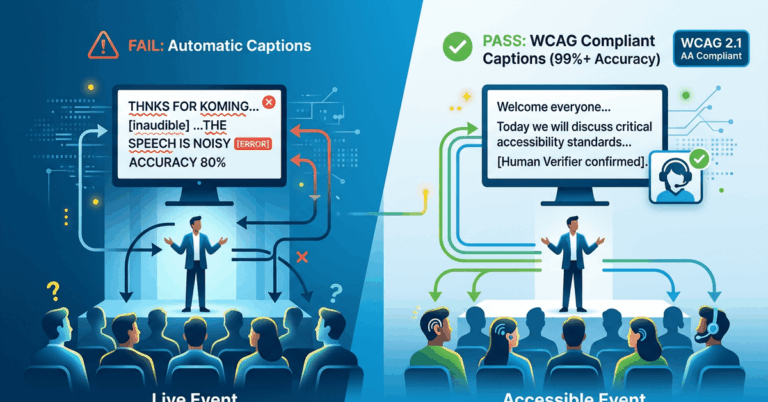
Audio quality live captioning accuracy is a direct, measurable relationship. A clean, well-captured audio signal with minimal background noise, consistent volume, and clear speech patterns can push transcription accuracy above 95 percent. A poor signal — muffled, reverberant, competing with crowd noise or HVAC hum — can drop that number into the 70s or lower, rendering captions unreliable and translations nearly unusable. For multilingual events, the problem compounds: if the source language transcription is inaccurate, every downstream translation inherits and amplifies those errors.
The decision that has the greatest impact on your captioning quality is not which captioning platform you choose. It is how you capture audio at the source. This guide walks through the practical decisions that professional event teams, AV managers, and production directors need to make — from microphone selection to speaker coaching to hybrid event signal routing — to ensure the audio reaching your captioning system is clean enough to deliver the accuracy your audience expects.
How Audio Quality Directly Affects Live Captioning Accuracy
To understand why microphone setup matters so much, it helps to understand what happens to your audio signal once it enters a captioning system. Real-time transcription engines — whether AI-driven or human-assisted — rely on clear phonetic input to identify words, segment sentences, and apply punctuation. The engine is essentially pattern matching against an enormous language model, and every decibel of noise or distortion introduces ambiguity into that matching process.
Signal-to-Noise Ratio Is the Core Metric
Signal-to-noise ratio (SNR) measures the level of the desired audio signal (the speaker’s voice) relative to the background noise floor. A higher SNR means the voice is cleaner and more distinct. For live captioning, SNR is the single most predictive metric for transcription accuracy.
SNR Range | Typical Captioning Accuracy | Practical Impact |
|---|---|---|
30 dB+ | 95–99% | Professional-grade captions, reliable translation |
20–30 dB | 85–94% | Usable captions with occasional errors |
10–20 dB | 70–84% | Frequent errors, translation quality degrades significantly |
Below 10 dB | Below 70% | Captions are unreliable and may confuse audiences |
These numbers shift depending on language complexity, speaker accent, and speaking speed, but the pattern holds: clean audio produces accurate captions, and noisy audio produces unreliable output regardless of how capable the transcription engine is.
Reverberation and Room Acoustics
Beyond background noise, room reverberation is a silent accuracy killer. In large halls, convention centers, and houses of worship with hard surfaces, reflected sound reaches the microphone milliseconds after the direct signal. The transcription engine hears overlapping copies of each word, making it harder to distinguish phonemes. A speaker in a reverberant room captured by a distant microphone will produce noticeably worse captions than the same speaker captured by a close-miked lapel or headset.
Microphone Selection for Maximum Captioning Performance
Not all microphones are equal when the goal is transcription accuracy. The right microphone choice depends on the event format, the number of speakers, and the physical environment.
Lavalier and Headset Microphones
For single-speaker presentations, keynotes, and sermons, a lavalier (lapel) microphone or a headset microphone provides the best captioning results. These microphones maintain a consistent, close distance to the speaker’s mouth, which keeps the SNR high and minimizes room noise pickup.
Lavaliers should be clipped 6 to 8 inches below the chin, centered on the chest. Headset microphones should be positioned at the corner of the mouth, roughly one finger-width away. Both configurations prioritize the direct voice signal and reject ambient sound.
Handheld Microphones
Handheld microphones are common at conferences and panel discussions. They can deliver excellent audio for captioning when used correctly, but they introduce a variable: the speaker controls the distance. A speaker who holds the microphone at waist level or waves it during gestures creates volume fluctuations that challenge the transcription engine. If handheld microphones are your only option, brief the speakers on holding the mic 2 to 4 inches from the mouth at a consistent angle.
Podium and Gooseneck Microphones
Podium microphones are standard in legislative settings, academic lectures, and formal conferences. Their fixed position is an advantage for consistency, but their distance from the speaker’s mouth is typically greater than a lavalier, which means they pick up more ambient noise. Cardioid or supercardioid pickup patterns help reject sound from the sides and rear, which improves SNR in noisy environments.
Boundary and Ceiling Microphones
Conference rooms and boardrooms often use boundary microphones on tables or ceiling-mounted microphone arrays. These are designed for general voice capture across a room, not for high-accuracy transcription. If you are captioning a meeting or hybrid event that relies on ceiling microphones, expect a measurable drop in accuracy compared to individual close-miked participants. Where possible, supplement ceiling arrays with individual lapel mics for primary speakers.
Speaker Coaching: The Overlooked Audio Quality Variable
Even with a perfect microphone setup, the speaker’s delivery directly affects captioning accuracy. This is an area where event producers can make a significant impact with minimal effort.
Pace and Enunciation
Speakers who rush through material — particularly when reading from scripts — produce speech that is harder for any transcription system to segment accurately. A natural speaking pace of 130 to 160 words per minute is ideal for real-time captioning. Above 180 words per minute, accuracy drops noticeably, especially for technical vocabulary and proper nouns.
Enunciation matters as much as pace. Speakers who trail off at the end of sentences, mumble through transitions, or swallow consonants introduce errors that no amount of post-processing can fix. A brief pre-event coaching note — even a one-page handout — can improve captioning outcomes substantially.
Microphone Discipline
Speakers who turn away from a fixed microphone, tap the mic, shuffle papers near it, or forget to unmute in hybrid settings create audio disruptions that directly degrade captions. Include microphone handling guidance in your speaker preparation packet. For panel discussions, remind panelists to wait for their microphone to be active before speaking and to avoid crosstalk.
Handling Accents, Technical Jargon, and Proper Nouns
For multilingual events and conferences with international speakers, accent variation is a real factor in transcription accuracy. This is not a limitation to apologize for — it is a variable to plan for. When possible, provide the captioning system with a glossary of key terms, proper nouns, organization names, and technical vocabulary before the event. Many professional captioning platforms, including VerbalScribe, support custom vocabulary to improve recognition of domain-specific language.
Noise Cancellation and Environmental Audio Control
Controlling the noise environment is just as important as selecting the right microphone. In live event settings, noise sources are everywhere: HVAC systems, audience movement, adjacent sessions in convention halls, live music before or after a keynote, and outdoor ambient sound for tent or festival events.
Hardware Noise Management
Use directional microphones (cardioid, supercardioid, or hypercardioid patterns) to reject off-axis noise. For wireless microphone systems, ensure clean RF signal management to avoid interference and dropouts — a wireless dropout that lasts even one second can cause the captioning engine to lose an entire phrase.
If your venue has controllable HVAC, reduce fan speed during keynote sessions. If it does not, position microphones to minimize HVAC pickup and consider a high-pass filter on the audio feed to roll off low-frequency rumble below 80–100 Hz.
Software and DSP Processing
Many modern audio consoles and digital signal processors (DSPs) include noise gate, compression, and equalization tools that can improve the signal before it reaches the captioning system. A gentle noise gate can suppress background noise during pauses. Light compression can even out volume variations from speakers who move relative to the microphone. EQ adjustments that boost the 2–4 kHz presence range can enhance speech intelligibility without introducing artifacts.
However, apply processing conservatively. Aggressive noise gating can clip the beginnings of words. Over-compression flattens the natural dynamics that help transcription engines parse speech. The goal is a clean, natural-sounding voice signal — not a heavily processed one.
AV Integration: Routing Clean Audio to Your Captioning System
The best microphone setup in the world is wasted if the audio signal is degraded between the source and the captioning platform. For professional event teams, audio routing is a critical technical decision that affects captioning quality.
Direct Audio Feeds vs. Ambient Capture
Always provide your captioning system with a direct audio feed from the mixing console rather than relying on an ambient room microphone or a camera-mounted mic. A direct feed from the console output, an auxiliary send, or a Dante audio-over-IP stream delivers the cleanest possible signal with the highest SNR.
Dante and Audio-Over-IP Workflows
For production teams using Dante-networked audio, routing a dedicated channel to the captioning system is straightforward and maintains signal quality end to end. Configure a separate Dante output or receiver for the captioning feed so it does not interfere with the main house mix or broadcast feed. This also allows the captioning feed to be a pre-fader, pre-effects send if desired, ensuring the transcription engine receives a consistent signal regardless of mix changes during the event.
Hybrid and Virtual Event Audio Routing
Hybrid events introduce additional complexity. Remote speakers joining via Zoom, Teams, or other platforms often have inconsistent microphone quality — laptop built-in microphones, Bluetooth earbuds, or noisy home environments. For captioning accuracy, treat remote audio as a separate challenge:
- Request that remote speakers use wired headsets or USB microphones.
- Use the platform’s audio output as a separate input to the captioning system.
- Apply noise reduction processing to the remote audio feed before it reaches the transcription engine.
- Monitor remote audio levels independently from in-room audio.
ProPresenter and Display Integration
For production teams using ProPresenter to manage on-screen content, integrating captioning output into the display workflow requires attention to both the audio input and the visual output. Ensure the captioning system receives audio from the console, not from a stage microphone routed through ProPresenter. The captioning display — whether embedded in ProPresenter output, shown on a dedicated monitor, or delivered to attendee devices — should be configured during rehearsal to confirm timing, formatting, and readability.
Scenario-Specific Audio Quality Live Captioning Configurations
Different event types present different audio challenges. Here are practical configurations for three common scenarios.
Conference Keynotes and Breakout Sessions
Use a lavalier or headset microphone on every speaker. Route a direct console output to the captioning system. For breakout rooms with panel discussions, assign individual microphones to each panelist and use an automatic mixer to manage open channels. Provide a glossary of session-specific terminology to the captioning platform in advance.
Houses of Worship
Worship environments combine speech and music, often in acoustically reflective spaces. For sermon captioning, a headset microphone on the pastor or speaker delivers the best results. Route the speech microphone as an isolated feed to the captioning system — do not send the full worship mix, as music and congregational audio will significantly degrade transcription accuracy. If multiple speakers share the platform, ensure each has an individual microphone and that transitions between speakers are clean.
Hybrid Corporate Events
Prioritize the in-room audio feed from the console for on-site speakers. For remote participants, use a dedicated virtual meeting audio output routed separately to the captioning system. Test the complete audio chain — in-room microphones, console routing, remote participant audio, and captioning input — during a full technical rehearsal at least 24 hours before the event. Monitor both feeds in real time during the event and have a plan to switch or adjust if audio quality degrades on either side.
Building Audio Quality Into Your Captioning Workflow
The relationship between audio quality and live captioning accuracy is not theoretical — it is the most practical, controllable variable in your captioning workflow. Every decision from microphone selection to signal routing to speaker preparation either strengthens or weakens the foundation your captions are built on.
For event teams committed to accessibility and multilingual inclusion, treating audio quality as a captioning decision — not just a sound reinforcement decision — changes outcomes. It means involving your captioning provider in the audio planning process, running captioning-specific audio checks during rehearsal, and building audio quality standards into your event production checklist.
VerbalScribe is built for production teams that take this seriously. With support for direct audio feeds, Dante workflows, ProPresenter integration, and custom vocabulary, the platform is designed to deliver accurate real-time captions and multilingual translations when it receives the clean audio signal it needs to perform. If you are planning a captioned event, start with the audio. Everything else follows from there.
Frequently Asked Questions
How much does microphone quality affect live captioning accuracy?
Microphone quality and placement are the single largest controllable factor in captioning accuracy. A close-miked speaker with a quality lavalier or headset microphone in a controlled noise environment can achieve transcription accuracy above 95 percent. A distant or low-quality microphone in a noisy room can reduce accuracy to 70 percent or below, regardless of the captioning platform used.
Should I send the full house audio mix to the captioning system?
No. Send an isolated speech feed from the console, typically from an auxiliary send or a dedicated output that includes only the speech microphones. Sending the full house mix — which may include music, sound effects, and ambient microphones — introduces noise that degrades transcription accuracy.
What is the best microphone type for captioning at live events?
Lavalier and headset microphones consistently deliver the best results for captioning because they maintain a close, consistent distance to the speaker’s mouth. Handheld microphones can work well if the speaker maintains proper technique. Podium gooseneck microphones are acceptable. Ceiling and boundary microphones typically produce the lowest captioning accuracy.
How does audio quality affect multilingual translation accuracy?
Multilingual translation depends on accurate transcription of the source language. If the source transcription contains errors due to poor audio quality, every translated output inherits and often amplifies those errors. A word misrecognized in English, for example, may produce a nonsensical translation in Spanish, French, or Mandarin. Clean audio at the source protects the accuracy of every downstream language.
What audio specifications should I target for live captioning?
Aim for a signal-to-noise ratio of at least 20 dB, with 30 dB or higher preferred. Sample rate should be at least 16 kHz, though 44.1 kHz or 48 kHz from a professional console is standard. The audio feed should be mono (a single clear speech channel is better than a stereo mix with spatial effects). Apply minimal processing — light compression and a high-pass filter are generally beneficial, but avoid aggressive noise gates or heavy EQ.
Can I improve captioning accuracy for speakers with strong accents?
Yes. Providing the captioning platform with a custom vocabulary list that includes key terms, proper nouns, and organization-specific language improves recognition accuracy. Speaker coaching on pace (130–160 words per minute) and clear enunciation also helps. Using a close-miked headset or lavalier reduces the acoustic ambiguity that makes accented speech harder for transcription engines to process.
How should I handle audio for hybrid events with remote speakers?
Treat remote and in-room audio as separate feeds. Request that remote speakers use quality USB microphones or wired headsets. Route the virtual meeting platform’s audio output as an independent input to the captioning system. Apply noise reduction to the remote feed if needed, and monitor both feeds during the event to catch quality issues in real time.